
Reviewed · KUALA LUMPUR
Malaysia eSIM (1 to 30 days. Up to 60GB of Data)
There’s nothing like landing with data ready. This Malaysia eSIM is priced low, emailed to you, and activated fast by scanning a provided QR code. I like that it supports 4G/5G on local rates, and I also like that you can use it for different trip lengths without hunting down a physical SIM.
The one real catch is simple: you must have an eSIM-capable phone (and internet access to activate it). Plan for setup on the same day as your departure, and keep your QR code handy in case your phone decides to play hard to get.
In This Review
- Key things to know before you rely on it
- Setting up your Malaysia eSIM before you even get to KLCC
- Data speed, caps, and what “3G after the limit” means for real trips
- Using it around Kuala Lumpur and beyond: staying connected where it counts
- Why this beats buying a local SIM (or renting a router)
- Customer service support when activation needs a nudge
- Device compatibility check: the one step you cannot skip
- Price and value: what $7.90 buys you across 1 to 30 days
- Quick checklist you’ll thank yourself for in Kuala Lumpur
- Should you book this eSIM plan?
- FAQ
- How do I receive the Malaysia eSIM?
- How do I activate the eSIM?
- What if I don’t have internet access for setup?
- Do I need an eSIM-compatible phone?
- How much data do I get?
- What happens after I use the high-speed data?
- Where is this experience based?
Key things to know before you rely on it
- Email delivery, no meetup. You get the eSIM info by email, then you activate on your schedule.
- QR-code activation is the whole game. Scan the QR code, enable data roaming, and you should be online quickly.
- 4G/5G at local rates, then 3G after the cap. High-speed data is limited (up to the plan’s total), after which speed drops.
- Built for phones that support eSIM. If your device doesn’t support eSIM, this won’t work.
- Remote customer service is included. If activation stumbles, you have support rather than being left alone.
Setting up your Malaysia eSIM before you even get to KLCC
Think of this eSIM as a “be online from the start” tool, not a souvenir. Your eSIM arrives in your inbox by email. No pickup, no waiting at a counter, and no “where do I go now?” moment after a long flight.
Activation is designed to be quick. You set it up on the same day as your departure date, then when you reach Malaysia you activate the data plan and turn on data roaming. One practical detail: setup needs internet access. So if you’re doing this the day you fly, make sure you have Wi‑Fi available (or another data source) long enough to complete the activation steps.
Also, print the QR code and carry it with you. That sounds old-school, but it’s smart. Phones break, batteries die, and screenshots disappear. A paper QR code is the low-tech backup that can save your day.
Location-wise, you’re starting in Kuala Lumpur (the experience location is listed there), with the end point near Tower 1 of the PETRONAS Twin Towers (KLCC). You won’t meet anyone at either spot, but it gives you a good sense of where you’ll likely use the service most: first in the capital, then as you move around.
Hold this one against a few other big sellers around KL before you decide.


Data speed, caps, and what “3G after the limit” means for real trips
This plan includes mobile data for the duration you selected, with high-speed capped data. After you use the included amount, the speed switches to 3G.
On paper, that sounds technical. In real life, it matters because different phone tasks behave differently:
- Maps and messaging usually stay usable even on slower speeds.
- Streaming, large downloads, and heavy social media use will feel slower once you hit the cap.
- Video calls can work, but you should expect it to become less comfortable after the high-speed portion ends.
The good news is that the service is described as delivering fast, reliable 4G for activities like streaming and video calling. In other words, you can plan your first busy days around getting around the city and using your phone as your main tool.
The description also says the plan can be up to 60GB of data. That’s the ceiling for high-speed usage in the version you choose. If your trip is short or you mainly use Wi‑Fi for videos, a shorter plan can stretch your budget. If you’re the type who constantly checks videos, uploads, and downloads, longer plans (and higher data amounts) will feel like a smoother ride.
Using it around Kuala Lumpur and beyond: staying connected where it counts
Kuala Lumpur is where you often make your decisions on the fly. You’ll search routes, check bus or ride-hail times, translate menus, and coordinate plans with people back home. Having data ready matters more than having perfect coverage everywhere.
The service is presented as working with 4G/5G across Malaysia. And one of the more interesting details from the feedback is that the internet speed was described as phenomenal even in rural areas, plus stable while traveling between cities. That’s exactly the kind of reliability you want if your trip includes more than just KL city breaks.
Here’s the value for your day-to-day:
- You can book transport or check timing without leaving your phone waiting for Wi‑Fi.
- You can upload photos while you’re still out (instead of saving everything for hotel Wi‑Fi).
- You can handle last-minute plan changes without wasting time hunting for a network.
Since the end point is KLCC (right by the PETRONAS Twin Towers), it’s a good mental image: you get online early in the city core, and then you keep that convenience as you branch out. If your schedule includes day trips, expect your experience to depend on the network conditions where you go—but the overall feedback suggests stability rather than constant dropouts.
Why this beats buying a local SIM (or renting a router)

People choose eSIM for a reason: speed and hassle. Buying a physical local SIM often means finding a shop, dealing with lines, dealing with language at the counter, and then hoping the process works smoothly with your phone. Pocket Wi‑Fi can be great, but you add another device to charge, carry, and keep track of.
With an eSIM:
- You install it directly into your phone.
- You avoid managing a separate device.
- You activate right around your travel timing, rather than waiting after you land.
And the practical bonus that shows up in real trips: switching becomes easier. If you’re a frequent traveler, the idea of moving between carriers without physical swaps is a big time-saver. It’s especially helpful if you’re doing multiple countries in one year and want your phone to behave like it should.
Is it always cheaper? Not guaranteed. But at $7.90 per person, it’s positioned as good value compared to the time cost and friction of doing it the traditional way. The best part is that you pay once and then focus on using your phone, not configuring it.
Customer service support when activation needs a nudge
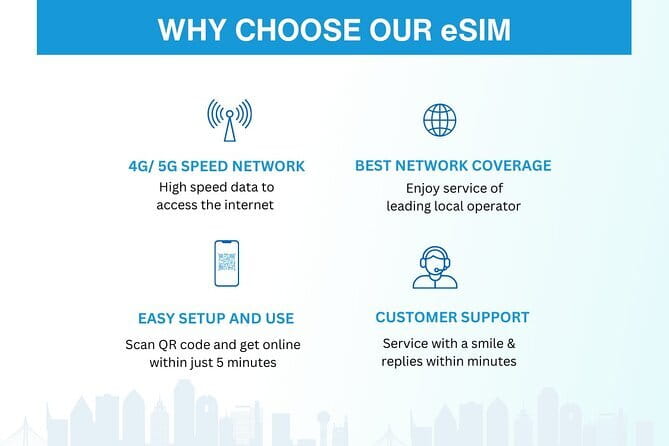
This experience includes remote customer service. That matters because eSIM setup can be straightforward, or it can trip on a detail like the wrong setting, a missing roaming toggle, or an activation step that’s easy to miss.
The setup guidance here is clear: you should activate the data plan after you arrive and enable data roaming. If that part doesn’t click instantly, having support is a relief rather than a dead end.
One more useful detail: the service is described as resolving small problems quickly and professionally. That’s the kind of support you want if your phone gives you a vague error message like something went wrong, but it does not explain why.
My tip for you: before you board, check that your phone settings show the eSIM option and that you know where to find the mobile data roaming toggle. If you’re already comfortable with your phone’s setup screens, activation day gets much calmer.


Device compatibility check: the one step you cannot skip
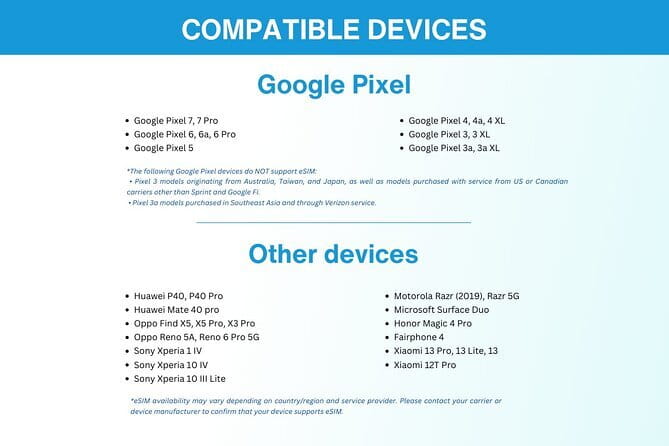
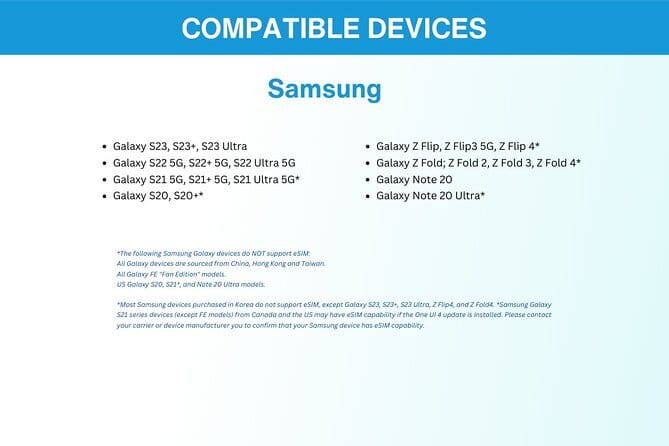
This product is only for devices that support eSIM. That’s stated clearly, and it’s the biggest decision point before you buy.
Before you order, do a quick check:
- Look in your phone’s cellular or mobile data settings for an eSIM option.
- Confirm you can add a carrier or plan using eSIM (not just physical SIM).
- If you’re unsure, ask for guidance before you go.
If your phone does not support eSIM, nothing else matters. You could have the right QR code, the right email, and the right plan, and still end up without data. So I treat compatibility checks as step one, not step two.
Also note: the service is described as for a smartphone or other mobile devices that support eSIM. So if you’re using a tablet or another device, make sure it supports eSIM too.
Price and value: what $7.90 buys you across 1 to 30 days

At $7.90 per person, this eSIM is priced like a budget-friendly convenience product. The real question is value per day, not just the headline price.
Here’s the simple math on the base cost:
- If you choose the longest option (up to 30 days), you’re paying about $0.26/day.
- If you choose a short stay (around 7 days), you’re paying about $1.13/day.
- If you choose the shortest option (1 day), it’s about $7.90/day.
Your value depends on which plan you select and how much data you actually use at high speed. If you’re mostly using maps, messaging, and browsing, you may be fine with a smaller high-speed allowance and let the 3G switch handle the leftovers. If you’re streaming, downloading, and living on social apps, you’ll want the higher data total and a plan that matches your usage.
One more value angle: the savings isn’t only money. It’s time. You avoid the need to find a SIM shop on arrival. You avoid extra hardware. And you reduce the chances of arriving in Kuala Lumpur and spending your first afternoon fixing your phone.
Quick checklist you’ll thank yourself for in Kuala Lumpur

Here’s how to make this go smoothly once you land, near KLCC and beyond:
- Have your email with the eSIM details saved offline if possible.
- Save the QR code details and consider printing the QR code.
- Set up your eSIM on the same day as your departure date (when you’ll have internet access).
- When you reach Malaysia, activate the data plan and enable data roaming.
- Watch your high-speed data usage so the 3G switch doesn’t surprise you during heavy use.
Small preparation keeps your trip feeling like it’s moving forward, instead of pausing for tech chores.
Should you book this eSIM plan?
I’d book it if you want fast connectivity in Kuala Lumpur without dealing with SIM shops or extra devices. It’s especially good for people who rely on their phone for navigation, messaging, and planning, and who want stable 4G performance for things like streaming or video calls during the early part of the trip.
I’d think twice if your phone doesn’t support eSIM, or if you tend to forget activation steps and don’t have reliable internet access to start the process. In those cases, the QR code might be ready, but your phone won’t be.
If you’re traveling for 1 to 30 days and you’re trying to keep your phone simple and your setup quick, this is a strong low-stress choice.
FAQ
How do I receive the Malaysia eSIM?
You receive the eSIM by email after ordering. There’s no physical pickup or meetup.
How do I activate the eSIM?
You activate it by scanning the unique QR code provided for you. The description also says you should activate the data plan and enable data roaming when you reach the destination.
What if I don’t have internet access for setup?
Setup requires internet access. Plan to do the initial eSIM setup on the same day as your departure date when you can connect to Wi‑Fi or another internet source.
Do I need an eSIM-compatible phone?
Yes. You should double-check that your device supports eSIM technology before buying. If you’re unsure, ask the provider before you go.
How much data do I get?
The plan offers up to 60GB of data (depending on the duration/plan you choose). High-speed data use is capped at that amount.
What happens after I use the high-speed data?
After you reach the high-speed data cap, the speed switches to 3G.
Where is this experience based?
It’s associated with Kuala Lumpur, Malaysia, with the referenced end point near Tower 1 of the PETRONAS Twin Towers (KLCC).
Filed Under Kuala Lumpur
- Kuala Lumpur: Batu Caves Half-Day Tour with Pick-Up Option
★ 4.5 · 4,288 reviews - Private Half-Day Batu Caves and Cutural Tour in Kuala Lumpur
★ 5.0 · 3,107 reviews - Sambal Streets Kuala Lumpur Food Tour with 15+ Tastings
★ 5.0 · 2,438 reviews - Historical Malacca Guided Day Tour (Shared Tour)
★ 5.0 · 2,172 reviews
Fresh Reviews from the Klang Valley
- Kuala Lumpur by Night: Food, Culture & City Lights Tour”
★ 4.5 · 3 reviews - Kuala Lumpur Customizable Tour
★ 5.0 · 3 reviews - National Zoo with Giant Panda
★ 3.5 · 3 reviews - Kuala Lumpur City to Kuala Lumpur International Airport Transfer
★ 5.0 · 3 reviews - Private Magical View With Petronas Tower & Cultural Dinner
★ 4.2 · 3 reviews